TL;DR
- Measure before you change anything. Find which stage of the call is slow: speech recognition, turn detection, the language model, tool calls, the voice model or the network.
- The language model and slow tool calls usually cause the longest pauses. Start there.
- Pre-tool speech, short replies and the right turn-taking settings make the agent feel faster even when processing time stays the same.
- Then choose a low-latency voice model and voice type, and keep processing close to your callers.
Your ElevenLabs agent takes two seconds to answer. The caller says "hello?", the agent starts speaking at the same moment, and both of them stop. By the third exchange, the caller is annoyed and the call is going nowhere.
High ElevenLabs agent latency is rarely caused by one setting. It's usually a combination of a slow language model, a tool call waiting on a slow system, a long prompt and a voice model built for quality rather than speed. This guide shows you how to find where the delay comes from and how to reduce it, using settings and figures from ElevenLabs' own documentation, checked in October 2026.
The 9 Fixes at a Glance
| Fix | Where to change it | Typical impact |
|---|---|---|
| 1. Faster language model for simple stages | Agent model settings, or per stage with workflow subagent nodes | High |
| 2. Stop tool calls creating dead air | Tool settings: pre-tool speech, execution mode, tool call sounds | High |
| 3. Trim the prompt and knowledge base | System prompt, knowledge base, workflow stages | Medium |
| 4. Low-latency voice model | Agent voice model settings | Medium |
| 5. Faster voice type | Voice selection | Low to medium |
| 6. Right audio output format | Output format settings | Low |
| 7. Tune turn-taking | Advanced tab: turn eagerness and timeouts | Medium (how fast it feels) |
| 8. Keep processing close to callers | Region, data residency (Enterprise), telephony routing | Medium |
| 9. Keep replies short | System prompt | Medium |
Impact ratings are our general guidance, not ElevenLabs benchmarks. Measure your own calls to find your biggest delay.
Before You Start
You'll need:
- An agent on ElevenAgents (previously called ElevenLabs Conversational AI). If you built it from an older ElevenLabs Conversational AI tutorial, the settings below now sit in the ElevenAgents dashboard. New to the platform? Start with what ElevenLabs is.
- Access to its model, voice, tool and Advanced settings
- 10 to 20 test calls you can repeat, including at least one that uses tools
- A way to measure the time between the caller finishing a sentence and the agent's first word
Change one thing at a time. If you switch the language model, voice model and region together, you won't know which change made the difference.
Where ElevenLabs Agent Latency Comes From
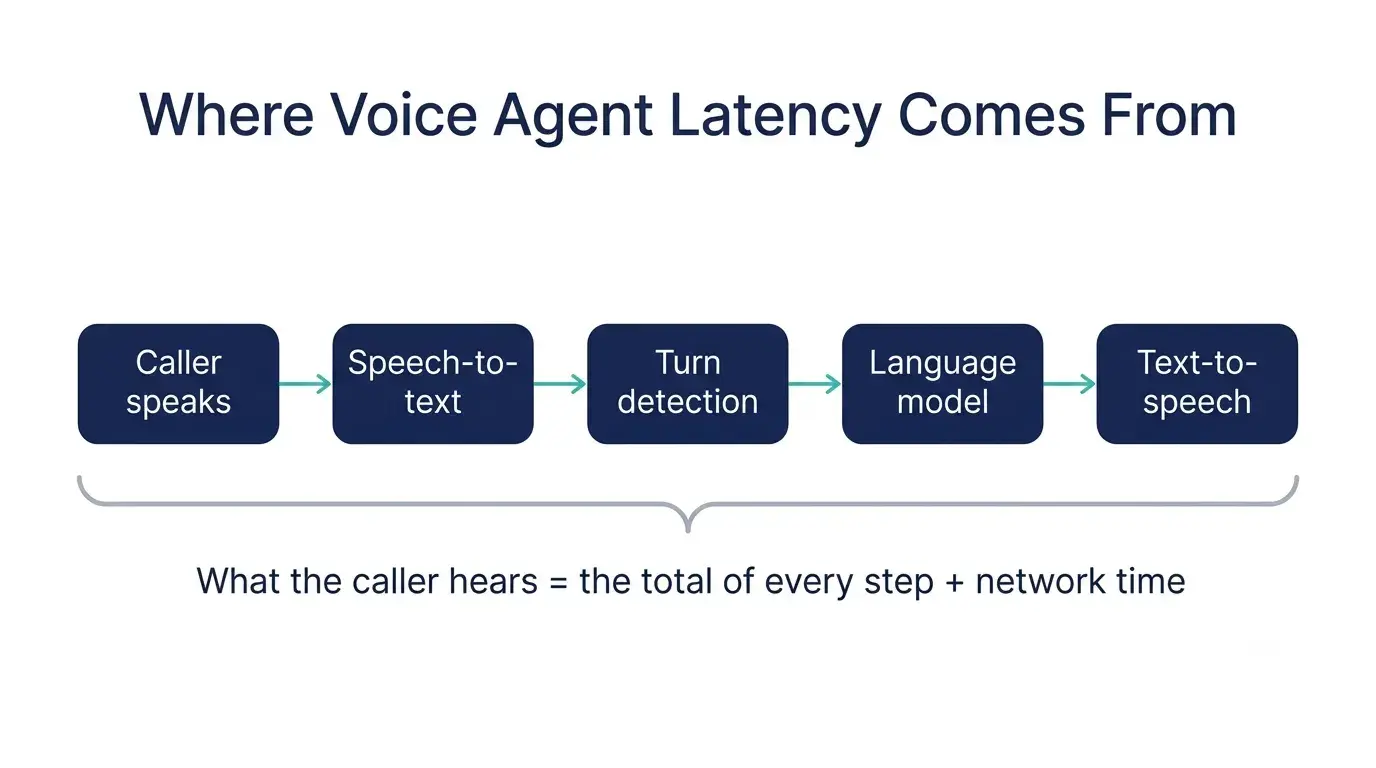
Every reply passes through five stages, and the caller hears the total of all of them:
| Stage | What happens |
|---|---|
| Speech-to-text | The caller's words are transcribed |
| Turn detection | The system decides the caller has finished speaking |
| Language model | The model decides what to say, and may call a tool first |
| Text-to-speech | The reply is turned into audio |
| Network and telephony | Audio travels between the caller, the phone carrier and ElevenLabs |
How fast is fast enough? In its guide to conversational AI latency, ElevenLabs puts the target below 700ms and says delays above 1,200ms lead to high abandonment. Getting below one second consistently is a realistic goal, and sub-second voice agent latency is where conversations start to feel natural.
One common misunderstanding: published model speeds describe one stage only. ElevenLabs' latency optimization guide lists Flash models at around 75ms of inference time and notes that this covers the model only, with end-to-end latency depending on your location and setup.
Step 1: Measure Where the Time Goes
Pick five slow calls and break each pause down:
- Does the delay happen on every turn, or only some? Delays only on certain turns usually point to a tool call or a long reply.
- Does the agent pause before speaking, or start quickly and then stall? A pause before speaking points to turn detection or the language model. A stall mid-reply points to tools or streaming.
- Is it worse for callers in one region? That points to network distance or telephony routing.
Track two numbers across at least 50 calls: the median delay and the slowest 5% (P95). Callers remember the long pauses, so a good average with a bad P95 still feels slow.
9 Ways to Reduce ElevenLabs Agent Latency
If you're trying to reduce conversational AI latency, these fixes are ordered roughly by typical impact, starting with the stages that usually add the most delay.
1. Choose a faster language model for simple stages
The language model is often the slowest stage. Larger models reason better but take longer to start replying. ElevenAgents lets you choose from supported models or bring your own, and ElevenLabs also offers hosted LLMs that run on its own infrastructure alongside speech-to-text and text-to-speech, which ElevenLabs says lowers latency.
You don't need one model for the whole call. In workflows, subagent nodes can use a different language model for each stage, so you can run a fast model for greetings and routing and a more capable model only where the agent needs to reason.
2. Stop tool calls from creating dead air
A tool call that waits on a slow API is the most common cause of a two-second pause. ElevenAgents gives you several ways to handle it:
- Pre-tool speech. The agent says a short acknowledgement, such as "Let me check that for you", while the tool runs in parallel. ElevenLabs added a
pre_tool_speechsetting with three modes:autodecides based on recent tool latency,forcealways speaks first, andoffturns it off. - Execution modes. ElevenLabs describes three: immediate (the tool runs as soon as the language model requests it), post-tool speech (the tool waits until the agent finishes speaking) and async (the tool runs in the background for actions the reply doesn't depend on, such as sending an email or logging data).
- Tool call sounds. Optional ambient audio, such as typing, that plays while a tool runs, so the caller hears activity instead of silence.
Then fix the tool itself. Speed up slow APIs, return only the fields the agent needs, and move lookups you can predict, such as fetching the caller's account details, to the start of the call.
Agent still slow after these first two fixes? Send us one recorded call where the delay happens, with any personal details removed, and we'll tell you which stage is causing it. Share a slow call with our team.
3. Trim the system prompt and knowledge base
Every token the language model has to read adds processing time. Remove instructions the agent doesn't need, split long prompts into workflow stages so each stage carries only its own instructions, and keep knowledge base content short and relevant. If an answer is rarely needed, consider moving it behind a tool call instead of loading it into every turn.
4. Choose a low-latency voice model
Voice model choice matters less than the language model, but it still counts. According to ElevenLabs' documentation:
- Flash runs at around 75ms of model inference time, with slightly lower audio quality than Multilingual v2.
- Eleven v4 Turbo is listed in the models documentation at around 100ms of latency, with more of Eleven v4's expressiveness.
- Eleven v3 Conversational is a low-latency version of Eleven v3 built for back-and-forth dialogue, and it powers expressive mode.
Test the options on your own calls. A slightly slower model that sounds natural can still beat a faster one if callers interrupt it less. Our ElevenLabs vs Cartesia comparison covers how the newest real-time models differ.
5. Use a faster voice type
ElevenLabs' latency guide notes that voice type can affect latency. Default voices, synthetic voices and Instant Voice Clones are faster than Professional Voice Clones. If you're using a Professional Voice Clone and latency is a problem, test an Instant Voice Clone of the same voice.
6. Avoid unnecessarily high audio formats
ElevenLabs notes that higher-quality audio output formats can increase latency. Phone audio doesn't need studio quality, so match the output format to the channel. A format built for high-fidelity playback adds processing without improving a phone call.
7. Tune turn-taking so the agent feels faster
Some of what callers experience as latency is turn detection, so tuning it is one of the quickest ways to lower voice bot response time as callers perceive it. ElevenLabs' conversation flow settings let you set turn eagerness to Eager, Normal or Patient. Eager responds sooner during quick back-and-forth. Patient waits longer and suits stages where callers read out phone numbers or addresses. Use workflows to change eagerness by stage.
The soft timeout lets the agent say a short filler during a long silence, and ElevenLabs limits it to once per turn so fillers don't pile up. ElevenLabs also says its orchestrator reduces perceived language model latency by predicting when the caller has finished speaking.
8. Keep processing close to your callers
Distance adds delay at every stage. ElevenLabs' latency guide lists typical time-to-first-byte for Flash over WebSockets at 100 to 150ms in North America, Europe and South East Asia, and 150 to 200ms in South Asia and North East Asia. Enterprise customers can use dedicated EU and India data residency environments for guarantees about server location as well as low latency.
Check the telephony side too. If calls route through a carrier region far from your callers, every turn pays for the extra distance.
9. Keep replies short
A short reply starts sooner and finishes sooner, so the caller gets their turn back faster. Limit each reply to one idea and one question. Long replies also make interruptions more likely, which adds more back-and-forth. Our guide on how to make an ElevenLabs agent sound natural covers how to write shorter, spoken-style replies.
Common Mistakes
Tuning the voice model first. If the language model or a tool call takes a second, switching to a faster voice saves only a fraction of the delay.
Reading 75ms as the call's total latency. That figure covers the voice model only. Callers hear every stage combined.
Measuring averages only. A median of 700ms with a P95 of 2.5 seconds still produces calls that go wrong.
Testing from one location. If your callers are spread across regions, test from each one.
Leaving tools silent. A tool that runs without pre-tool speech or a tool call sound turns every lookup into dead air.
Disabling interruptions everywhere. ElevenLabs advises leaving interruptions allowed by default, since suppressing them makes conversations feel less responsive. Use stricter tool interruption settings only where a tool must finish, such as a transfer.
How to Confirm You're Below One Second
- Run at least 50 test calls covering your main call types, including tool-heavy flows.
- Call from the regions your real callers are in, over the same telephony route.
- Include interruptions, long pauses and callers reading out numbers.
- Record the median and P95 delay from the end of the caller's sentence to the agent's first word.
- Repeat after every change, and keep the test set so you can re-run it.
ElevenAgents includes automated testing, so you can save these scenarios and re-run them after each change. Our guide to ElevenAgents implementation covers how testing fits into a full rollout, and our comparison of AI voice agent platforms explains why latency figures from different vendors can't be compared directly.
Frequently Asked Questions
What is a good latency for an ElevenLabs agent?
A good ElevenLabs agent latency is below one second from the end of the caller's sentence to the agent's first word. ElevenLabs puts the target for conversational AI below 700ms and says delays above 1,200ms lead to high abandonment. Measure the slowest 5% of responses as well as the median, because occasional long pauses still frustrate callers.
Why is my ElevenLabs agent so slow to respond?
An ElevenLabs agent is usually slow because of the language model, a tool call waiting on a slow system, or a long prompt and knowledge base. Turn detection set too cautiously, a high-quality voice model, and network distance add more delay. Measure which stage is slow before changing settings, then fix the largest delay first.
Which ElevenLabs model has the lowest latency?
Flash has the lowest model latency, at around 75ms of inference time according to ElevenLabs, with slightly lower audio quality than Multilingual v2. Eleven v4 Turbo is listed at around 100ms with more expressiveness, and Eleven v3 Conversational is built for low-latency dialogue. These figures cover the voice model only, not the full call.
Does the language model affect ElevenLabs agent latency?
Yes, often more than any other setting. Larger language models take longer to start replying. Use a faster model for simple stages such as greetings and routing, and switch to a more capable model only where the agent needs to reason. ElevenLabs also offers hosted LLMs running on its own infrastructure to reduce latency.
Does voice choice affect latency?
Yes. ElevenLabs' latency guide says default voices, synthetic voices and Instant Voice Clones are faster than Professional Voice Clones. Higher-quality audio output formats can also increase latency. For phone calls, choose a voice type and output format that match the channel rather than the highest quality available.
Next Step: Send Us One Slow Call
Run the measurement in Step 1 on five of your slowest calls. In many cases, the cause is the language model or a tool call, and fixing one of those brings the agent close to sub-second responses.
If you can't find it, send us one recorded call where your ElevenLabs agent paused too long. We'll listen to it and tell you which stage is causing the delay and what to change first. Remove or mask any personal or health information before you share a recording.
Send us a call recording, or read our guide to choosing an ElevenLabs implementation partner if you're looking for longer-term help.